
Nesting software for SLS & MJF
Lower builds.
More parts per run.
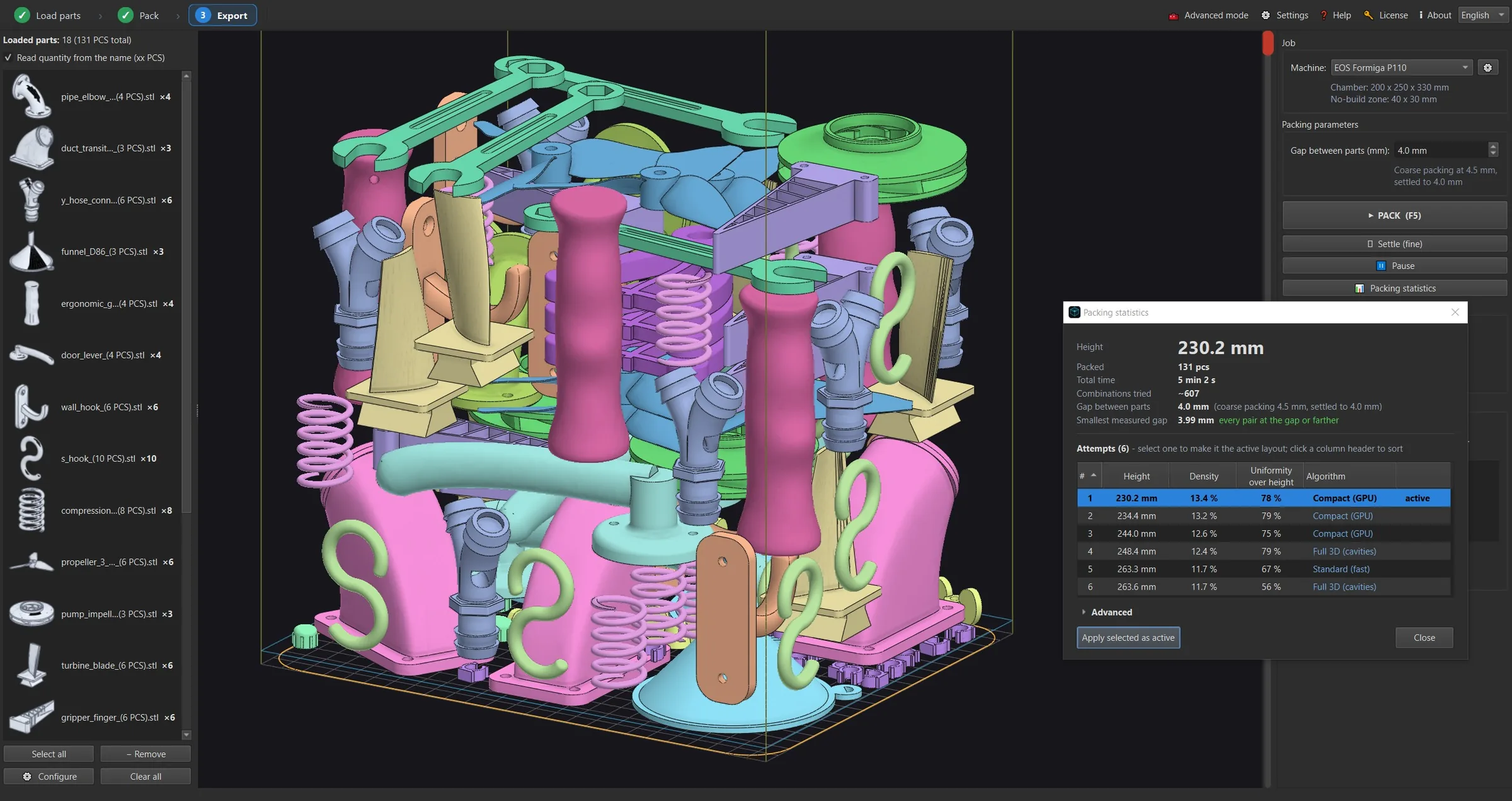
024Nester packs your STL parts into the build volume automatically, checks every pair for collisions on the real geometry, and exports the packed parts as STL files that you load into your slicer software.
Full version during the trial, including export. No registration. Windows 10 / 11.
- Input
- STL, OBJ
- Output
- Packed STL files
- Printers
- Any build volume you define
- Units
- mm / inch
- Languages
- EN, DE, SR
- System
- Windows 10 / 11
How it works
From STL files to a printable job
01
Load your parts
Drop in STL files - one or hundreds. A quantity in the file name, like "bracket_(12 PCS).stl", adds the copies for you. Set your build volume, gap and layer thickness once.
02
Nest and settle
Press Pack. Many layouts are tried in parallel on all CPU cores and the lowest clean one is kept, then the parts are settled down into the gaps. You can stop at any time and keep the best result so far.
03
Check and export
Every pair of parts is checked for collisions on the real triangle mesh. Inspect the result, then export the packed parts as STL files and load them into your slicer software.
Features
Made for production, not for demos
Works on the real 3D geometry, not on bounding boxes, and adapts to whatever printer you describe.
Packing
Nests on the real geometry
Parts are packed by their real shape, into the free space and cavities around other parts, not stacked as boxes. The gap between parts is yours to set.
Packing
Uses every CPU core
Many different layouts are evaluated in parallel and the best one wins. More cores, more attempts in the same time.
Control
Orientation and priority
Allow or lock rotation and tilt per part, mark the surface that must face up, and keep critical parts in the lower layers.
Control
Protective box for small parts
Tiny parts can be packed into a perforated box that prints with the job, so nothing gets lost in depowdering.
Production
Collision report
Overlaps and too-small gaps are listed and highlighted in 3D before anything goes to the printer.
Production
Your files stay on your PC
All computation is local. No upload, no cloud account. Only a short licence check goes over the internet.
Who we are
Built next to a production line
024Nester is developed by a small engineering team in Serbia. It started as an in-house tool: packing powder-bed builds by hand took too long and left too much chamber height unused, so we wrote the software we wanted to use ourselves.
Every release is tried on real production jobs before it goes out. When you write to us, you reach the people who write the code - not a ticket queue.
Free trial
Run your next build with 024Nester
The full version, including saving and STL export, so you can print a real job and compare it with how you pack today. No sign-up, no email address, no account.
- ✓ Windows 10 / 11, 64-bit · 8 GB RAM minimum (16 GB recommended) · no internet needed except for licence and update checks
- ✓ Your 3D models never leave your computer
Version 2.0.367 · 174 MB · released 2026-11-21
We do not ask for your details and store nothing that identifies you - see our Privacy Policy. Installing accepts the Licence Agreement: 024Nester proposes and checks a layout, the final check before printing is yours.
Technical details
The ZIP contains the installer 024Nester_setup_2.0.367.exe. Unzip it and run the installer.
SHA-256: 49cdd0184693dd6da3629488a73ccabd6922bbe1c382f836c98ae71d21dcc6ea
What is included in the free trial?
Everything. During the trial period every function is unlocked, including saving projects and exporting the packed STL files, so you can run real jobs on your own printer. There is no registration and no credit card.
What happens when the trial ends?
Nesting, settling and the collision check keep working. Saving and exporting then need a licence for your machine. Write to us and we will send an offer - every paid licence has a 30-day money-back guarantee.
Which printers does it work with?
Any powder-bed printer whose build volume you can describe: width, depth, height, layer thickness and zones that must stay empty. It is built and tested on SLS production. The packed parts are exported as STL files, which you load into the slicer software you already use.
Which files does it read and write?
Input: STL (binary and ASCII) and OBJ. Output: the packed parts as STL files, each in its place in the build volume, ready for your slicer - and project files you can reopen later.
Are my model files uploaded anywhere?
No. All nesting happens on your own computer and your files never leave it. The only network traffic is a short licence check.
How big can a job be?
Hundreds of parts per build are normal. Packing time grows with the number of parts and the time budget you set; you can stop at any moment and keep the best result found so far.
Who is behind 024Nester?
A small engineering team in Serbia that runs SLS production itself. 024Nester started as an in-house tool because packing builds by hand took too long and wasted chamber height. Questions go straight to the people who write the code.
Want to see it on your own parts?
Send us a few STL files and your build volume and we will send back the nested job and the numbers. Licences, integrations and technical questions go to the same address.